%22%2F%3E%0A%20%20%3Cpath%20d%3D%22M32%205C35%205%2037.7%206.7%2039.2%209.6L58%2050.9C60.4%2056.2%2056.5%2062%2050.7%2062C47.6%2062%2044.8%2060.2%2043.5%2057.4L24.8%2016.4C22.4%2011.2%2026.2%205%2032%205Z%22%20fill%3D%22url(%23right)%22%2F%3E%0A%20%20%3Cpath%20d%3D%22M24.8%209.6C27.6%203.5%2036.4%203.5%2039.2%209.6L32%2025.4L24.8%209.6Z%22%20fill%3D%22%23B6B6FF%22%2F%3E%0A%20%20%3Cpath%20d%3D%22M23.9%2040H39.5L45%2052H18.5L23.9%2040Z%22%20fill%3D%22url(%23bridge)%22%2F%3E%0A%20%20%3Cpath%20d%3D%22M23.9%2040H39.5L18.5%2052L23.9%2040Z%22%20fill%3D%22%239795F5%22%2F%3E%0A%3C%2Fsvg%3E)
Pet Health Scan
Observation Support Using Video and Images
An iOS concept that helps pet owners capture and organize visible observations about movement, eyes, teeth, and skin, then prepare useful questions for a veterinary professional. It does not diagnose conditions.
Proof boundary: This is a product and workflow record, not a clinical evaluation. Model performance, medical accuracy, delivery time, production status, and health outcomes have not been independently validated.
The Challenge
Hard-to-Describe Changes
Pet owners may notice a change but struggle to capture it clearly or explain what they saw during a veterinary visit.
Video Analysis Complexity
Movement footage varies in lighting, angle, duration, and camera stability, so the capture flow needs visible quality guidance.
Non-Diagnostic Guidance
Provide helpful health insights while clearly communicating this is not a replacement for veterinary care.
Our Solution
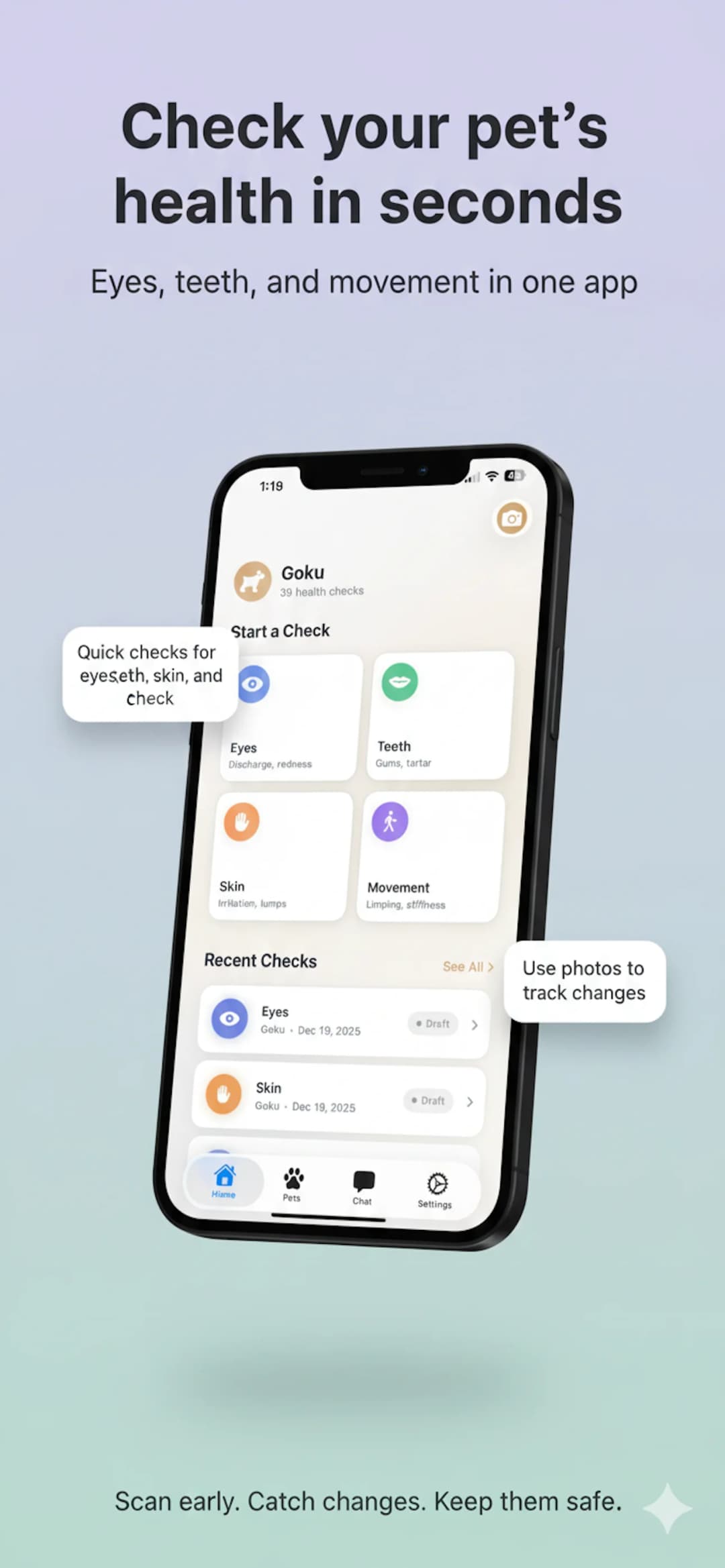
We designed a native iOS workflow that routes video and image inputs through separate analysis contracts, adds capture-quality checks, and turns visible observations into a structured summary for veterinary discussion.
Gait Observation
Video-based movement notes
Eye Photo Review
Visible eye observations
Oral Photo Review
Visible teeth and gum notes
Skin Photo Review
Visible coat and skin notes
Quality Scoring
Blur & brightness detection
PDF Export
Shareable health reports
Pet Profiles
Dogs and cats
Next-Step Categories
Structured guidance with safeguards
Tech Stack
- Swift 5.9
- SwiftUI
- iOS 17+
- SwiftData
- Image Workflow
- Video Workflow
- Input Routing
- Uncertainty Signals
- AVFoundation
- Quality analysis
- Video compression
- Guided capture
- Authentication
- App Telemetry
- Media Uploads
- Structured Responses
Observation Workflows
Movement Observation (Video)
Video workflowPet owners record their pet walking. The workflow summarizes visible movement patterns such as an uneven stride, stiffness, or asymmetry without labeling a condition.
Walking video → Notes possible asymmetry → Suggests reviewing the footage with a veterinarian if it persistsEye Observation (Photo)
Image workflowThe image workflow organizes visible details such as cloudiness, redness, or discharge and reminds the owner that a photo cannot establish a diagnosis.
Eye photo → Notes visible cloudiness → Provides questions for a veterinary discussionOral Observation (Photo)
Image workflowThe image workflow describes visible plaque, gum color, or possible damage and provides questions for professional review.
Teeth photo → Notes visible buildup → Suggests asking about an oral examinationSkin Observation (Photo)
Image workflowThe image workflow describes visible changes in the coat or skin and helps the owner record what changed over time.
Skin photo → Notes a visible irritated area → Suggests documenting changes and contacting a veterinarian if concernedNext-Step Guidance
The app cannot rule out illness or assess an emergency. If a pet is in distress or the owner is worried, the safe next step is to contact a veterinary professional immediately.
Record and Monitor
The limited input does not surface a configured warning signal. This is not medical clearance. The owner can keep a record and seek care whenever concerned.
Schedule a Vet Visit
The observation may be useful to review with a professional. The app prepares specific questions without deciding urgency.
Contact a Vet Promptly
A configured warning signal or owner-reported concern prompts direct contact with a veterinary professional. The app does not determine emergency status.
Documented Product Facts
Guided Capture
- Separate workflows for movement video and detail photos
- Input routing based on media type and observation goal
- Image quality scoring before analysis
- PDF export for vet visits
Safety by Design
- Non-diagnostic language throughout the observation flow
- Visible uncertainty and input-quality guidance
- Escalation prompts whenever the owner is concerned
- Facilitates better vet conversations with prepared questions
Need video analysis AI for your app?
We design video and image workflows with clear input guidance, structured outputs, and safeguards appropriate to the domain.